
- Stable Audio has a new workspace. Find your apps, projects, and latest generations in one place. Organize your work and pick up where you left off.
- Meet two new apps. Generate is a new starting point for making music and sound effects, with more ways to prompt and edit your audio. Sampler makes packs of short samples you can sequence and edit.
- Explore experimental apps in Labs. We've also added Labs, where you can try beta apps. Sessions, our multitrack app in beta, has new updates based on your feedback and now lives in Labs.
- As always, everything is powered by our commercially safe models. You own your outputs, and can distribute outputs freely. Try it out here and tell us what you think.
We've been working on new ways to create with Stable Audio, giving you more flexibility in how you generate, edit, and work with sound.
This month brings a few big updates: a new workspace to organize your projects and generations, two new apps for creating full tracks and sample packs, and a new way to access our experimental apps. We've also made several improvements to Sessions, our multitrack editor app in beta.
Here's a look at what's new.
Open Stable Audio
One workspace for everything you make
The new Stable Audio workspace brings your apps, projects, and sounds together in one place. Instead of navigating between separate experiences, you can find everything you make in a single window, with one player and one place to find any take.
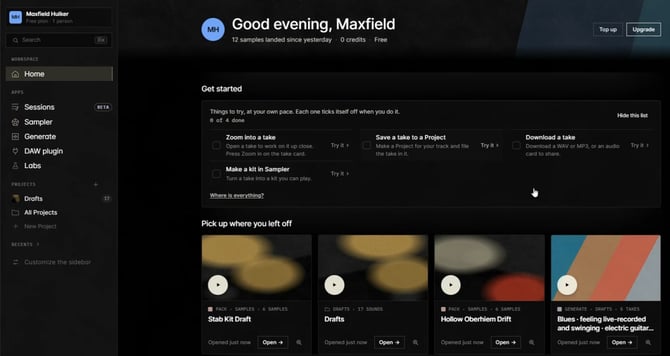
Home is where you'll land when you sign in. From here, you can check your credit balance, pick up a saved project, revisit a draft, or listen to your latest generations.
Library is where you can browse and organize everything you've made across Stable Audio's apps. You can move between apps to start a sample or track in one app, and keep working on it in another.
Generate: A starting point for new sounds
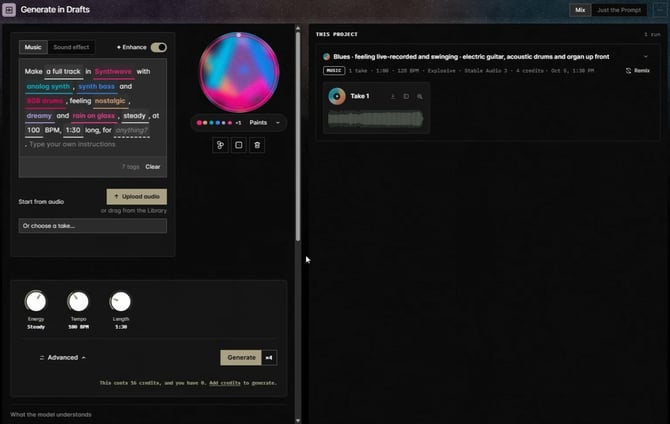
The new Generate app is where you can start making music and sound effects. Describe what you're looking for, generate a set of takes, and work from there.
To prompt, you can either use text, or you can describe it visually by adding different "paints" to a mixer representing different genres, styles, and instruments.
Make changes without losing the parts you like. Once you have a take you want to work with, you can keep shaping it rather than starting over. Use the Lens to zoom in on your track, trim it, add fades, replace a section, or extend it. Each edit creates a new version, so you can experiment without losing the original.
The Lens is available across Generate, your projects, and other apps, giving you a consistent way to work on any track.
Sampler: Create packs of samples and loops
Where Generate makes full tracks and sound effects, Sampler makes sets of short samples, loops, or drum kits meant to be played and sequenced together.
Start with a prompt like "techno risers" and generate a collection of up to eight variations. You can also create a full drum kit, with eight individual one-shot samples to work with. From there, refine individual samples and explore different variations.
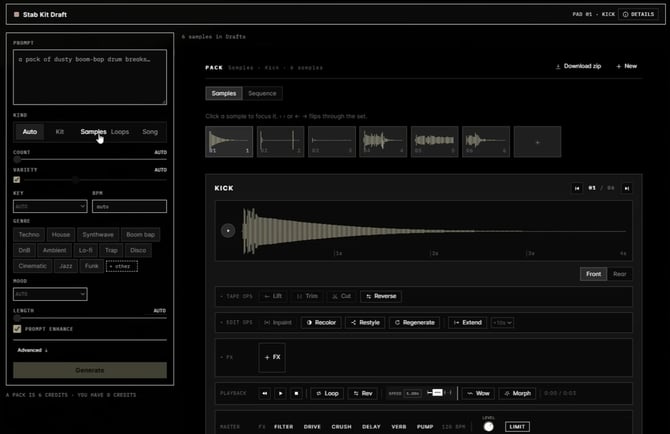
When you're ready to put those sounds together, head to the Sequence tab.
The built-in step sequencer lets you:
- Set your tempo and choose the length of your sequence in bars.
- Program up to eight instruments on a 16-step grid, in patterns up to 32 bars.
- Mute or solo individual instruments.
- Play back your pattern and make changes as you go.
- Print loop renders your pattern into a loop and adds it to your pack.
You can download the whole pack as a ZIP or individual samples, bring them into your DAW, or use them in other Stable Audio apps, including Sessions.
Labs: A place for experimental apps
We're continuing to build new ways to work with audio. That's why we've created Labs: a place to find our experimental apps and try them out while they're still in beta.
The sounds you create in beta apps can be saved in your Projects.
One of the first apps in Labs is Sessions, which we've continued to develop based on feedback from the community.
Sessions: Layer multiple tracks in a mix
Sessions is a multitrack workspace for bringing different sounds together. Record, arrange, and mix takes into one piece, then work with a producer you can direct through chat to make changes.
Since introducing Sessions in beta, we've made several enhancements to the experience. You can now choose between two ways to work:
- Full mix. Work with a complete mixed track as your starting point.
- Multi-track. Work with an editable eight-track deck, where you can arrange and mix individual tracks.
It's still in beta, so features are experimental. Tell us what would help most.
Which app should I use? A quick breakdown
| If you want to... | Use |
|---|---|
|
Make a full track or a sound effect, then shape it over several takes |
Generate |
| Build a pack of short samples or a drum kit, then sequence them | Sampler |
| Layer stems and samples into one arranged, mixed piece | Sessions (beta, in Labs) |
| Generate right inside your DAW, next to the rest of your project | The Stable Audio plugin |
Find your way of working
Everyone has their own process. You might start with a full track, build a collection of samples, or bring different sounds together in a multitrack session. And sometimes, you don't know what you want to make until you start experimenting.
We're building Stable Audio to support those different ways of working.
Give the new workspace and apps a try, and let us know what you'd like to see next.
Rock on 🤘
The Stable Audio team